Vehicles and drivers
01- Vehicle records and status
- Driver information
- Vehicle assignments
- Driver portal
INTEGRA ERP
Active vehicles
82
Trips today
146
Fuel
31%
Maintenance
14
Vehicle movement
Fuel
31%
Maintenance
14
INTEGRA ERP
Manage vehicles, drivers, and commercial activity in a dedicated fleet workspace, moving from quotation and contract to invoice, claim, and financial tracking.
Track KPIs, requests, statuses, and daily alerts in one workspace shaped around this system workflow.
INTEGRA ERP
Current period
Active vehicles
+12%82
Trips today
+8%146
Fuel
+4%31%
Maintenance
+15%14
Vehicle movement
82
Fuel consumption
146
Maintenance alerts
31%
INTEGRA ERP
The system goes beyond a vehicle directory by connecting assets, drivers, customers, contracts, commercial activity, and financial results.
Connected workflow
Fleet teams use shared customer, finance, people, and reporting records instead of duplicating data across separate systems.
Real product interface
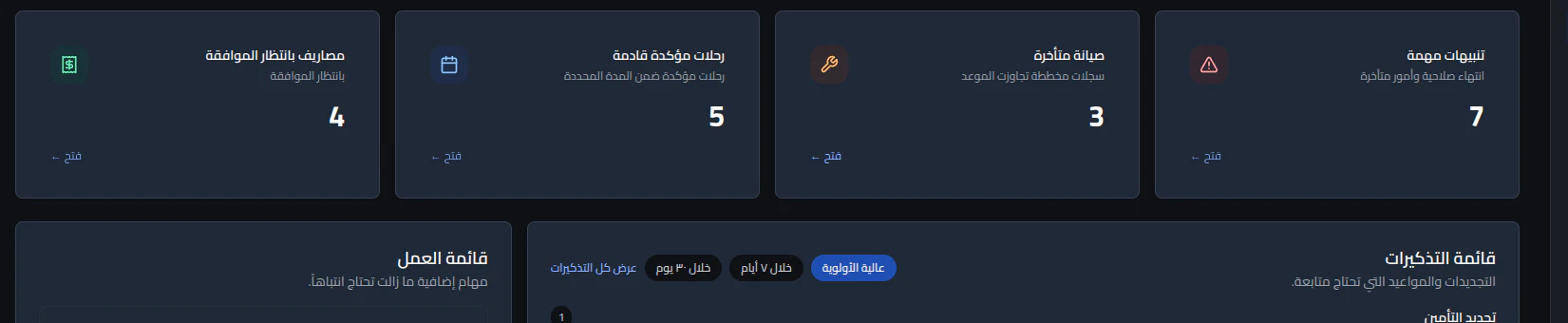
An actual Arabic/RTL fleet dashboard showing important alerts, overdue maintenance, confirmed trips, pending expenses, and prioritized work and reminder queues.
 View full-size screenshot
System depth
These modules are arranged as a practical workflow: record the action, read the signal, then take the next step without jumping between disconnected tools.
Operate
Organize vehicle records, status, assignments, driver information, and driver-portal workflows.
Active vehicles
82Trips today
146Fuel
31%Measure
Connect customers to quotations, contracts, documents, and operating activity in one record.
Act
Track claims, expenses, invoices, collections, accounting results, and performance reports.
INTEGRA ERP
Short answers to help you understand implementation, integrations, and plan fit.
No. It connects vehicle and driver records with customers, quotations, contracts, claims, expenses, invoices, collections, accounting, and reporting.
Yes. Permissions can separate vehicle operations, commercial work, finance, payroll, configuration, and driver-facing workflows by role and action.
Yes. Invoices, claims, and vehicle-linked expenses can flow into the shared accounting foundation and management reports.
Yes. A company can operate multiple branches and enable fleet alongside other Integra ERP activities within the same isolated company workspace.

Share your details and we will contact you to discuss your company needs and suitable sectors.
AlQassim, Saudi Arabia